ntryk
ntryk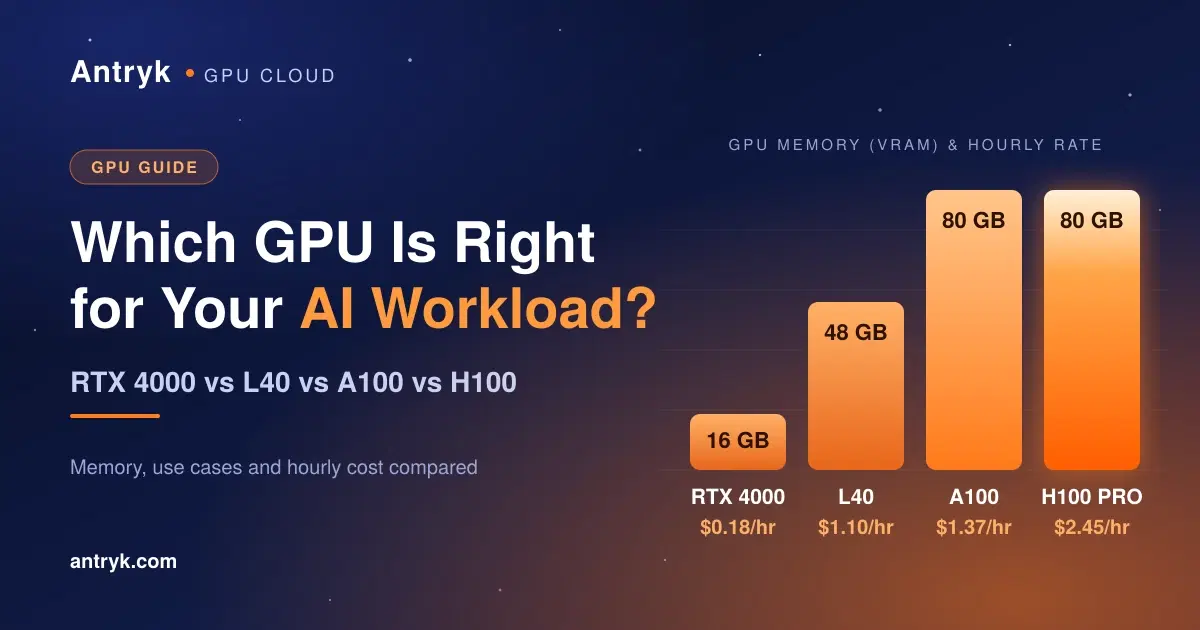
Choosing a GPU for an AI application is not as simple as selecting the most powerful option available. The right choice depends on your model size, GPU memory requirements, inference traffic, performance expectations, and budget.
A smaller GPU may be enough to run an image-generation application or serve a lightweight language model. A larger GPU may be necessary for high-throughput inference, larger models, or demanding machine-learning workloads.
Four options worth comparing are the RTX 4000, L40, A100, and H100. They serve different purposes, ranging from cost-conscious GPU application hosting to demanding AI workloads.
In this guide, we'll compare their memory capacity, strengths, typical use cases, and costs to help you choose the right GPU for your application.
1. Quick comparison: RTX 4000 vs L40 vs A100 vs H100#
Here is a practical starting point for choosing between these GPUs.
| RTX 4000 | 16 GB | Lightweight inference and smaller AI applications | Lowest |
| L40 | 48 GB | Generative AI, image generation, and inference | Mid-range |
| A100 | 80 GB | Demanding inference, model training, and larger workloads | High |
| H100 PRO | 80 GB | High-throughput inference and demanding AI training | Highest |
Memory and plan names reflect Antryk's published listings. GPU performance depends on the specific card variant, software, model, and workload.
The main distinction is that more GPU memory does not automatically mean better performance for every task. The L40, for example, offers 48 GB of GDDR6 memory and strong graphics and inference capabilities, while the A100 uses high-bandwidth HBM2e memory and is designed for demanding AI and high-performance computing workloads.
2. RTX 4000: A starting point for lightweight AI workloads#
The RTX 4000 plan is the most affordable of these four options on Antryk's pricing page, listed at $0.18 per hour with 16 GB of GPU memory, 64 GB of RAM, and four vCPUs.
When should you choose RTX 4000?#
Consider it when you're:
Deploying a relatively small language model or inference pipeline.
Building an AI-powered API or prototype.
Testing an AI application before production.
Running GPU-accelerated workloads that fit comfortably within its available memory.
The key is to check the memory required by your model, including runtime overhead and the context length or batch size you expect to use.
For example, a lightweight inference API may run well on a smaller GPU, while a model with large memory requirements or heavy concurrent traffic may need a larger card.
Who should choose it? Developers validating an AI product, testing inference workloads, or keeping initial infrastructure costs low.
3. L40: A balanced option for generative AI and inference#
The NVIDIA L40 is a data-center GPU based on the Ada Lovelace architecture. Its 48 GB of GDDR6 memory, fourth-generation Tensor Cores, and graphics capabilities make it suitable for a broad range of AI, inference, and visual computing workloads.
Antryk lists its L40 plan at $1.10 per hour, with 48 GB of GPU memory, 256 GB of RAM, and 16 vCPUs.
When should you choose L40?#
Consider the L40 for:
Image generation and other generative AI applications.
AI inference workloads that need more memory than an entry-level card provides.
Computer vision and GPU-accelerated image processing.
Graphics, rendering, and visual computing.
Applications where a 48 GB memory capacity fits the model and expected workload.
The L40 is a particularly useful option when you need more memory headroom without moving directly to an 80 GB accelerator.
Who should choose it? Developers running more demanding inference workloads, generative AI services, or GPU-powered visual applications.
4. A100: For demanding AI workloads and model training#
The NVIDIA A100 is built for data-center AI, deep learning, analytics, and high-performance computing. Its 80 GB configuration uses HBM2e memory with bandwidth exceeding 2 TB/s, making it a strong option for memory-intensive AI workloads.
Antryk lists its A100 plan at $1.37 per hour, with 80 GB of GPU memory, 512 GB of RAM, and 16 vCPUs.
When should you choose A100?#
An A100 may be a good fit for:
Large-model inference that needs more GPU memory.
Deep learning and fine-tuning workloads.
Higher-throughput inference pipelines.
Data-intensive machine-learning workloads.
Applications that benefit from high memory bandwidth.
One important consideration: the A100 is available in different configurations, including 40 GB and 80 GB variants. Check the actual instance specification before deployment rather than assuming every A100 has 80 GB.
Who should choose it? Teams running substantial AI workloads that require high memory capacity and strong data-center compute capabilities.
5. H100: For high-performance AI training and inference#
The NVIDIA H100 uses the Hopper architecture and features a Transformer Engine designed to accelerate transformer-based AI workloads. NVIDIA's published specifications include 80 GB memory on the H100 SXM configuration, with different specifications for other variants.
Antryk lists its H100 PRO plan at $2.45 per hour, with 80 GB of GPU memory, 512 GB of RAM, and 20 vCPUs.
When should you choose H100?#
Consider H100 for:
High-throughput LLM inference.
Demanding transformer workloads.
Training and fine-tuning workloads that benefit from Hopper architecture capabilities.
Production AI systems with significant compute requirements.
Applications where reduced processing time can justify a higher hourly rate.
H100 isn't automatically the best choice for every AI application. If your model fits comfortably on a less expensive GPU and the performance meets your needs, paying for H100 may not deliver enough additional value.
Who should choose it? Teams with demanding AI workloads that can take advantage of H100's compute capabilities and justify its higher cost.
6. GPU pricing comparison: What will your workload cost?#
An AI application's total cost depends on how long the GPU runs, how efficiently it is used, and how much processing power the application needs.
Based on Antryk's published hourly rates, here is how the four options compare.
| RTX 4000 | $0.18 | $18 | $131.40 |
| L40 | $1.10 | $110 | $803 |
| A100 | $1.37 | $137 | $1,000.10 |
| H100 PRO | $2.45 | $245 | $1,788.50 |
Calculated from Antryk's listed hourly prices. These are illustrative GPU compute costs only, before any applicable additional charges or taxes. The 730-hour column represents continuous active usage, not a typical month with hibernation.
How to reduce your GPU hosting costs#
Here are four practical ways to avoid spending more than your workload requires.
- 1
Match the GPU to your model. Don't select an 80 GB GPU if a smaller card meets your memory and performance requirements.
- 2
Measure actual usage. Test inference latency, throughput, GPU memory utilization, and concurrent requests.
- 3
Reduce idle time. If your workload permits it, use hibernation or stop compute when it isn't needed. Check the platform's standby billing terms.
- 4
Compare cost per successful request. A more expensive GPU can sometimes be more economical if it completes enough additional work to offset its higher hourly rate.
For example, a GPU that costs twice as much per hour but processes more than twice as many requests could deliver a lower cost per request. Benchmark your own model to find out.
7. How to choose the right GPU for your AI application#
Use this decision guide as a starting point.
Choose RTX 4000
Your model is relatively small, your traffic is limited, and minimizing initial compute costs is the priority.
Choose L40
Your workload needs 48 GB of GPU memory and benefits from strong inference, generative AI, or graphics capabilities.
Choose A100
Your workload benefits from 80 GB of high-bandwidth memory and substantial AI compute capacity.
Choose H100
Your workload can benefit from Hopper-specific capabilities and higher-performance AI training or inference.
Before making a final choice, verify the exact GPU variant, model compatibility, memory requirements, and benchmark performance. These recommendations are starting points, not substitutes for workload testing.
8. Deploy your AI application with Antryk#
Choosing a GPU is only one part of deploying an AI application. You also need to configure dependencies, provide environment variables, select runtime commands, and make sure the application starts correctly.
Antryk's GPU Application Service supports Git-based deployments, Docker container images, configurable build and start commands, environment-variable management, and GPU plan upgrades. Its published pricing also describes on-demand hibernation to reduce costs during periods of inactivity.
If you're evaluating GPUs for your next AI project, explore the available plans here:
Find the right GPU for your workload#
Compare Antryk's GPU options, review the published rates, and choose a plan based on your application's memory and performance requirements.
Explore Antryk GPU Pricing
Frequently asked questions#
Is RTX 4000 enough for AI inference?#
It can be enough for smaller models and lightweight inference workloads. The right choice depends on the model's memory footprint, precision, context length, and expected request volume.
Is L40 better than A100?#
Not universally. L40 has 48 GB of GDDR6 memory and strong graphics capabilities, while A100 offers an 80 GB HBM2e configuration with higher memory bandwidth. The better option depends on the specific workload and performance requirements.
Is H100 worth the extra cost?#
It may be worth the additional cost when its capabilities improve throughput or reduce processing time enough to offset the higher hourly rate. For lighter workloads, a less expensive GPU may provide better value.
Which GPU is best for running an LLM?#
Smaller models may run on GPUs with less memory, while larger models or workloads with higher concurrency may need more memory and compute. Estimate the model's memory requirements and benchmark inference before selecting a GPU.
Can I start with a smaller GPU and upgrade later?#
Antryk's pricing page describes GPU plan upgrades without rebuilding the deployment configuration from scratch. Check the service's current upgrade workflow and any migration considerations before changing plans.
Conclusion#
There is no single best GPU for every AI workload. RTX 4000 is a sensible starting point for lighter inference, L40 offers a higher-memory option for generative AI and graphics, A100 suits demanding memory-intensive workloads, and H100 targets workloads that benefit from its advanced AI compute capabilities.
The best decision balances GPU memory, measured performance, utilization, and total cost.