ntryk
ntryk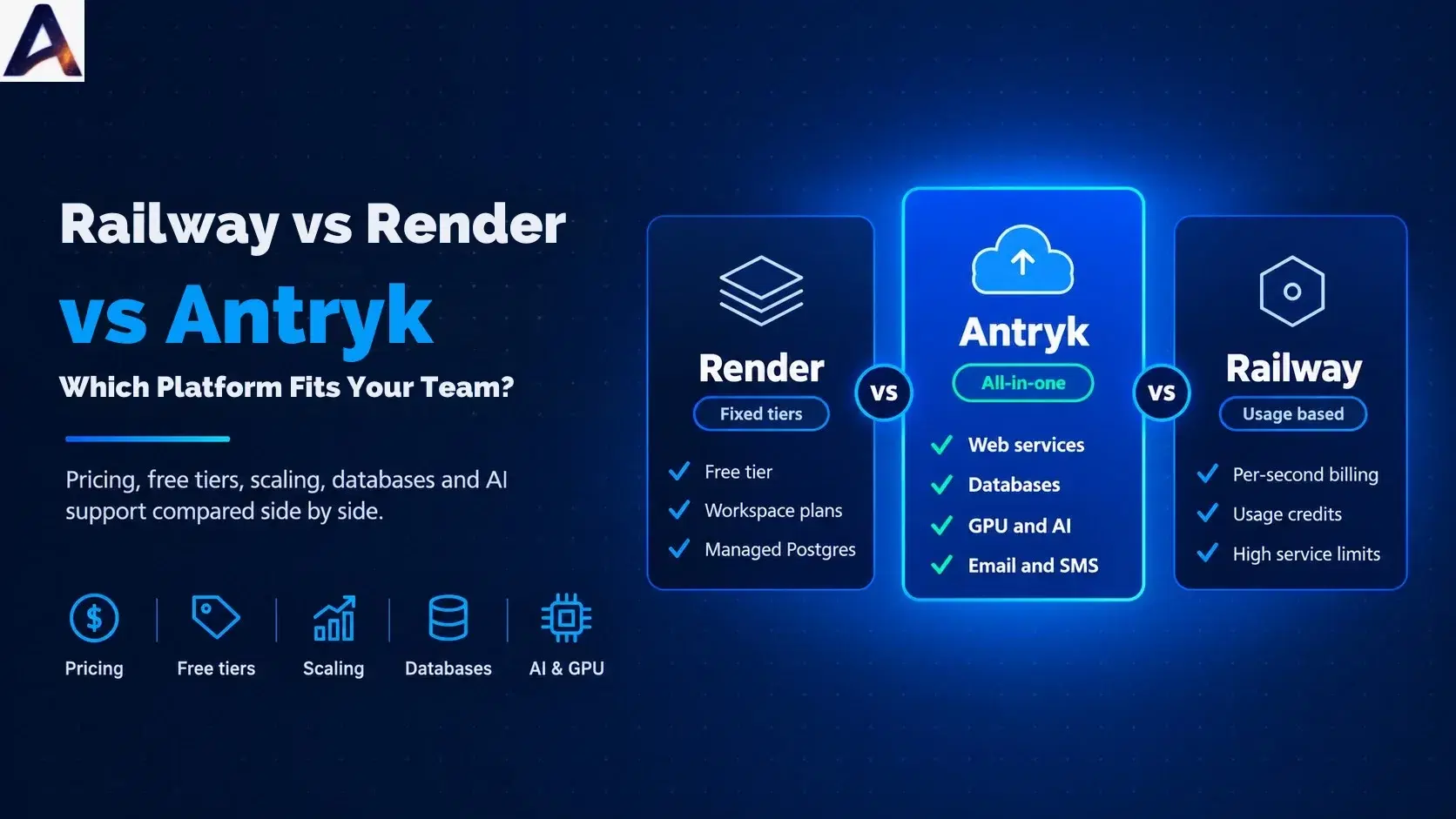
Shipping an application used to mean renting servers, configuring them by hand and hoping nothing broke at 2 a.m. Today, platforms let you point at a Git repository and go live in minutes. The hard part is no longer deploying. The real challenge now is deciding which platform to build your product on, since that decision affects your costs, your architecture and your ability to scale
This guide walks through three options developers often shortlist: Antryk, Render and Railway. You will learn how these platforms work, how their pricing models differ, where each one is strong, and how to estimate what your own project would cost. Everything here comes from each provider's public pricing and product pages, checked in October 2026. Because plans and pricing are subject to change, we recommend confirming current details directly with each provider before you commit.
What a Deployment Platform Actually Does#
A deployment platform, often called a platform as a service (PaaS), sits between your code and the underlying servers. Instead of provisioning machines yourself, you connect a repository, choose how much computing power you want, and the platform builds, runs and monitors your application.
Most platforms handle a similar core set of jobs:
Building and releasing code whenever you push to a branch
Running your service with a public address and an SSL certificate
Managing configuration, including environment variables and secrets
Scaling resources up or down as traffic changes
Providing data services such as databases and storage
Collecting logs and metrics so you can see what is happening
The differences appear in how each platform prices these jobs, how many adjacent services it offers, and how much control it gives you. Those differences are what the rest of this article explores.
Meet the Three Platforms#
Antryk#
Antryk presents itself as an all-in-one cloud platform. Beyond web services, static sites, cron jobs and background workers, its product line includes managed databases (PostgreSQL, MySQL, Redis and InfluxDB), vector databases (Milvus, Qdrant, Chroma and Weaviate), GPU workloads, S3-compatible object storage, and messaging tools for email, SMS and WhatsApp. It also offers free uptime monitors. Deployment works from GitHub or GitLab, with free SSL, a global CDN and zero-downtime releases.
Render#
Render organizes pricing around workspace plans (Hobby, Pro, Scale and Enterprise) plus the compute you choose. It offers web services, static sites, background workers, cron jobs, managed Postgres and a Redis-compatible Key Value store. Its instance tiers are clearly named and priced, from a free plan up to 12 CPUs and 96 GB of memory.
Railway#
Railway centers on usage-based billing. Its Free, Hobby, Pro and Enterprise plans include different resource ceilings, and you are charged per second for the CPU, memory, storage and network traffic your services actually consume. The Hobby and Pro plans come with monthly usage credits.
Three Different Ideas About Pricing#
The most important thing to understand is that these platforms do not just charge different amounts. They charge in different ways, so comparing a single number from each pricing page is rarely useful.
Antryk: starting prices per service. Each product has a "from" price. Web services start at $4.99 a month, managed and vector databases at $5.99, GPU workloads at $0.18 per hour, object storage at $10, email at $14.99 and SMS at $15.99. A combined plan starting at $55 a month is aimed at teams using three or more services. Usage is deducted from your balance by the hour, and deleting a service stops its billing.
Render: workspace fee plus fixed instance tiers. The Hobby workspace is free, Pro is $25 a month and Scale is $499. On top of that, you pay for compute at fixed tiers: for example, $7 a month for a small instance with 512 MB of memory, or $25 for one CPU and 2 GB. Bandwidth beyond your plan's allowance costs $0.15 per GB. Compute is prorated to the second.
Railway: metered consumption. Rather than picking a tier, you pay for what runs. Published rates include $0.00000772 per vCPU per second, $0.00000386 per GB of memory per second and $0.05 per GB of outbound traffic. The Hobby plan has a $5 monthly minimum with $5 of credits, and Pro has a $20 minimum with $20 of credits.
Each model rewards a different kind of project. Fixed tiers are easy to budget. Metered pricing can be cheap for spiky or idle workloads. Bundled starting prices can be attractive when you need several services together.
Side-by-Side Snapshot#
| Pricing style | Starting price per service | Workspace fee plus fixed tiers | Metered per-second usage |
| Entry price for web hosting | From $4.99/mo | Free tier; paid from $7/mo | Plans from $5 minimum usage |
| Trial or free option | $10 trial credit | Free web service, Postgres, Key Value and static sites (with limits) | 30-day trial with $5 credit, then a small free plan |
| Billing granularity | Hourly | Prorated to the second | Per second |
| Databases listed | PostgreSQL, MySQL, Redis, InfluxDB | Postgres, Key Value | Not detailed on the pricing page |
| Vector databases | Yes (four engines) | Not listed on pricing page | Not listed on pricing page |
| GPU workloads | Yes, from $0.18/hr | Not listed on pricing page | Not listed on pricing page |
| Messaging (email, SMS, WhatsApp) | Built in | Not listed on pricing page | Not listed on pricing page |
"Not listed" means the item does not appear on that provider's pricing page. It does not prove the feature is unavailable, so check the documentation for anything that matters to you.
Free Tiers and Trials#
Free options are the easiest way to test a platform, but they work very differently.
Render offers the broadest free resources: a free web service with 512 MB of memory, a free Postgres database with 256 MB, a free Key Value instance with 25 MB, and free static sites. These come with limitations that Render documents separately, so read them before depending on a free service for anything important.
Railway offers a 30-day trial with $5 in credits, followed by a free plan at $1 a month, limited to one vCPU and 0.5 GB of memory per service. No credit card is required to start.
Antryk lists a $10 trial credit on each service. Its pricing page does not say whether that credit is one-time or recurring, or how long it lasts, so confirm the terms before planning around it.
If your goal is to experiment at zero cost, Render has the most generous free offering on paper. If you want to try several different services in one place, Antryk's trial credit covers its whole range.
Compute, Scaling and Limits#
Scaling is where the platforms' philosophies show most clearly.
Antryk's web services include auto-scaling, git-based auto-deploys, rollbacks and uptime monitoring. Background workers and cron jobs cover scheduled and long-running tasks. The pricing page does not publish maximum instance sizes or the CPU and memory included at each starting price, which makes direct hardware comparisons difficult until you check with the team.
Render's tiers are explicit. You can move from a free instance to a 12-CPU, 96 GB instance, and persistent disks cost $0.25 per GB per month. That clarity makes capacity planning straightforward.
Railway publishes the highest ceilings of the three: up to 48 vCPU and 48 GB per service on Hobby, and up to 1,000 vCPU and 1 TB per service on Pro, with multiple replicas available. Teams expecting very large single services may find that headroom appealing.
Databases and Storage#
Almost every application needs somewhere to keep data, and how a platform handles that affects both cost and complexity.
Antryk lists managed PostgreSQL, MySQL, Redis and InfluxDB, with automated backups, scaling and high availability, plus S3-compatible object storage starting at $10 a month. If your stack includes MySQL or time-series data, having them on the same platform as your application is convenient.
Render provides managed Postgres with point-in-time recovery (three days on Hobby, seven on higher plans) and a Key Value store. Postgres includes 1 GB of storage, with extra storage at $0.30 per GB.
Railway prices volume storage by the second and lists object storage at $0.015 per GB-month with free egress, but its pricing page does not detail managed database products, so check its documentation for current options.
AI Workloads: GPUs, Models and Vector Search#
AI features are now part of many products, from chat assistants to semantic search. Running them usually requires three things: compute for models, a place to store embeddings, and a way to serve everything reliably.
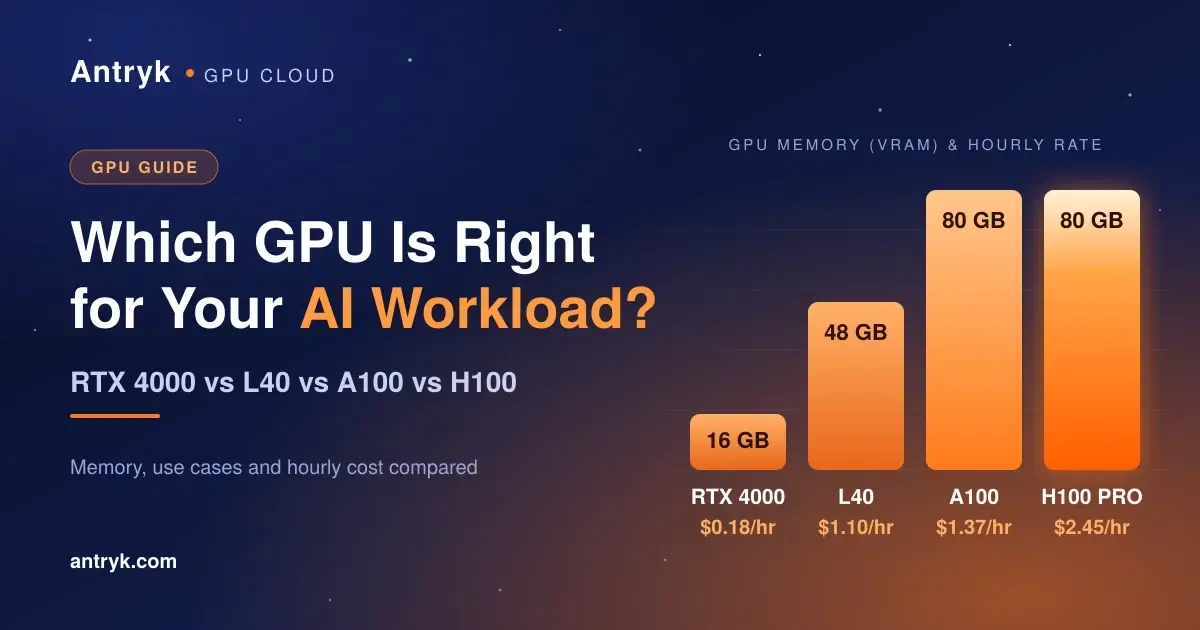
This is where Antryk's all-in-one approach is most distinctive. Its product pages list GPU workloads (A100, H100, L40, A30, A40, L4, T4 and V100 options), a way to deploy open-source models such as Llama and Gemma, and managed vector databases with no per-query or per-vector charges. For a team building retrieval-augmented generation (RAG) features, having the model, vector store and application in one place can reduce integration work.
Render's and Railway's pricing pages do not list GPU instances or vector databases. Teams building AI features on those platforms commonly connect separate providers, which is perfectly workable but adds another vendor and another bill.
Messaging and Monitoring#
Many apps need to send password resets, order confirmations or alerts. Antryk bundles email delivery, SMS and WhatsApp Business messaging, along with free uptime monitors that alert by email and SMS. That removes the need to sign up with a separate messaging provider for simple use cases. Render and Railway concentrate on hosting, so messaging typically comes from third-party services.
How to Estimate Your Real Cost#
Because the pricing models differ, the most honest way to compare is to model your own workload. Here is a simple method.
- 1
List what you will run. Count web services, workers, databases, storage and any special needs such as GPUs or messaging.
- 2
Estimate resources for each. Note the CPU, memory and storage you expect to need at launch, not at your dream scale.
- 3
Add traffic. Estimate monthly outbound data, since bandwidth is charged differently on each platform.
- 4
Price it on each platform. Use the official pricing pages, and ask providers directly where specifications are not published.
- 5
Add a buffer. Real usage almost always differs from estimates, so leave room.
To see how metering works, consider a simple illustration on Railway. Suppose a service averaged 0.5 vCPU and 1 GB of memory around the clock for a 30-day month. That is 2,592,000 seconds. At the published rates, CPU would cost roughly $10 and memory roughly $10, about $20 in total before credits, and the Hobby plan's $5 credit would reduce that. A service that sits idle much of the time would cost less, because Railway bills for what is consumed.
On Render, a service that needs one CPU and 2 GB of memory would use the $25 monthly instance on a free Hobby workspace, a predictable figure regardless of how busy the service is, plus any bandwidth overage.
These are illustrations, not quotes. Your numbers depend on real consumption, so treat them as a way to understand the models, not as a price list.
Which Platform Fits Which Team?#
Choose Antryk if:
You want applications, databases, AI workloads and messaging under one roof
You need GPUs or vector databases without stitching together extra vendors
You prefer a per-service starting price and want a single bill
Choose Render if:
You like fixed, named instance tiers that make budgets easy to predict
You want a generous free plan for prototypes and side projects
Your team values clearly defined workspace plans as it grows
Choose Railway if:
You prefer paying precisely for the resources you consume, by the second
Your workloads are bursty, or often idle
You may need very large single services
No platform is the best for everyone. A small team shipping a simple API has very different priorities from a company training and serving machine learning models.
A Simple Trial Plan Before You Commit#
Reading comparisons helps, but testing beats guessing. Before moving a production system, try this:
Deploy a real slice of your app on your top two choices, not a "hello world"
Run it for a week or two with realistic traffic
Compare the actual bills, build times and deploy experience
Test an incident: roll back a release, check logs and see how quickly you can find a problem
Read the exit path: check how easily you could export your data and move on
A short trial costs little and often reveals deal-breakers, such as a missing database engine or a pricing quirk, that no comparison article can catch.
Frequently Asked Questions#
Is Antryk a good alternative to Render?#
Antryk covers the same core need of deploying web services from Git and adds GPU workloads, vector databases and messaging in one platform. Render offers clearly defined instance tiers and workspace plans. The better fit depends on whether you value breadth or predictable tiers.
Is Antryk a good alternative to Railway?#
Both let you deploy from a repository and scale services. Railway bills by the second and publishes higher single-service limits, while Antryk bills hourly and bundles AI and messaging tools alongside several database types.
Which platform has the best free tier?#
On paper, Render's free tier is the broadest. Railway offers a 30-day trial then a small free plan, and Antryk offers a trial credit across its services.
Can I run AI or GPU workloads on these platforms?#
Antryk lists GPU workloads and open-source LLM deployment. Render's and Railway's pricing pages do not list GPUs, so check their documentation for current support.
How often do prices change?#
Fairly often. Always confirm details on each provider's official pricing page before you commit.
Final Thoughts#
The right deployment platform is the one that matches how you build, how you grow and how you like to pay. Render rewards teams that like fixed tiers and a generous free plan. Railway rewards those who want precise, per-second billing and high ceilings. Antryk rewards teams that want to keep applications, data, AI workloads and messaging in one place.
If that last description sounds like your project, explore Antryk's products, review the pricing, read the documentation, or start for free and deploy your first service today.
Pricing and features were checked against each provider's public pages in October 2026 and may have changed. Always confirm current details on the official sites.