ntryk
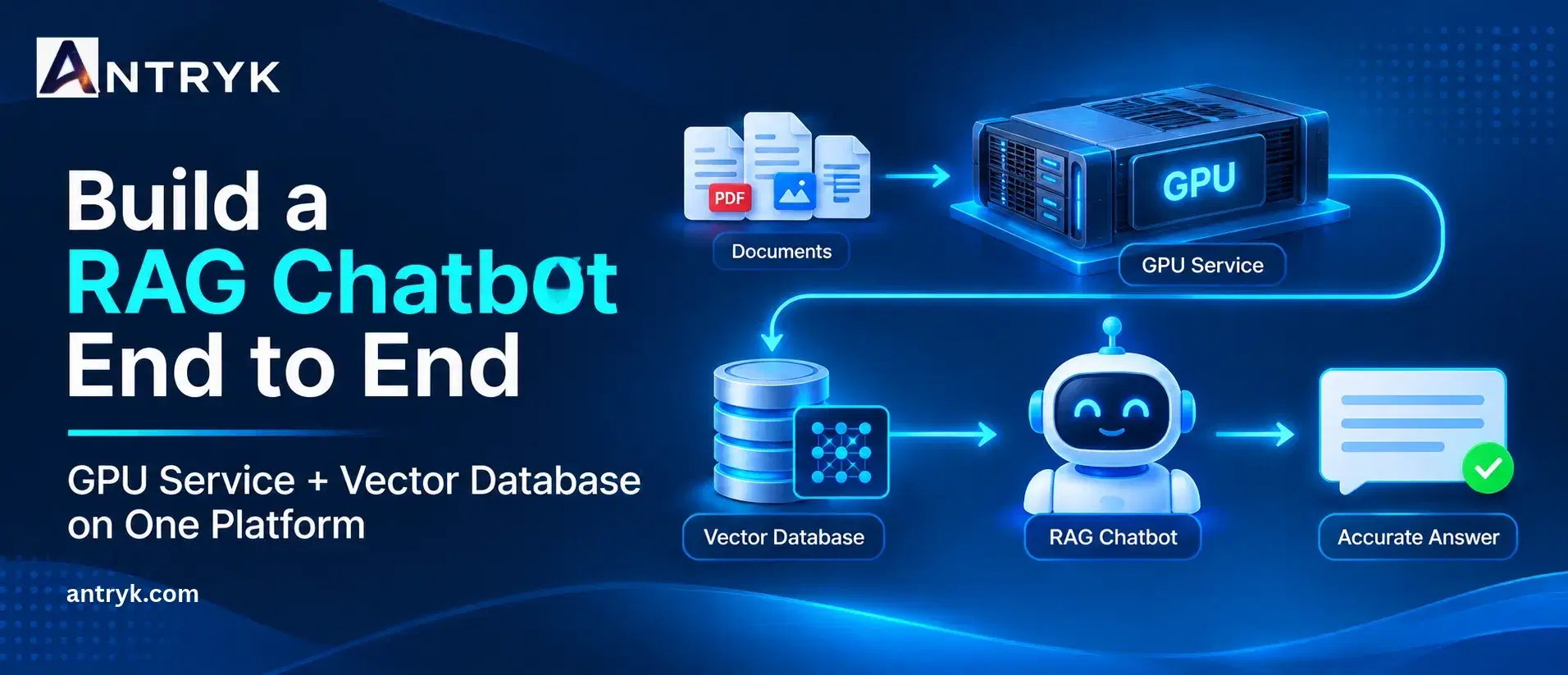
Build a RAG Chatbot End to End: GPU Service + Vector Database on One Platform#
Artificial intelligence is transforming how businesses interact with information. From customer support assistants to internal knowledge management systems, organisations are increasingly using Large Language Models (LLMs) to build intelligent applications. However, traditional AI chatbots often struggle when users ask questions about specific company documents, internal policies, product information, or recently updated data.#
This is where Retrieval-Augmented Generation (RAG) becomes valuable.#
A RAG chatbot combines the language-generation capabilities of an LLM with information retrieved from an external knowledge base. Instead of relying entirely on information learned during model training, it searches relevant documents and uses that information to generate contextual responses.#
But building a production-ready RAG chatbot requires more than connecting an LLM to a document collection. Developers need computing infrastructure for model inference, an embedding pipeline, a vector database, document storage, and an application layer that connects everything.#
A reliable GPU Service is particularly important when developers want to host and run their own AI models. Similarly, a scalable vector database is essential for storing document embeddings and retrieving relevant information efficiently.#
What if you could manage GPU computing and vector database infrastructure through one platform?#
In this guide, we will explain how to build a RAG chatbot end to end, explore the technologies involved, walk through the implementation process, and discuss how Antryk can simplify the infrastructure behind your AI application.#
What Is a RAG Chatbot?#
A Retrieval-Augmented Generation chatbot is an AI application that retrieves relevant information from an external knowledge source before generating a response.#
Traditional chatbots generally depend on predefined answers, external APIs, or the knowledge embedded in an LLM. This can create limitations when an application needs to answer questions about private business information or frequently changing documents.#
A RAG chatbot addresses this challenge by connecting an LLM to a searchable knowledge base.#
For example, imagine an e-commerce company with thousands of product descriptions, return policies, shipping documents, and customer support guidelines.#
A customer asks:#
"What is your return policy for damaged products?"#
Instead of generating an answer based only on general knowledge, the RAG chatbot searches the company's actual policy documents, retrieves the relevant information, and uses it to construct an appropriate response.#
This makes answers more relevant to the organisation's data.#
How Does Retrieval-Augmented Generation Work?#
A typical RAG chatbot follows three primary stages:#
1. Retrieval#
The system searches a vector database to identify document sections relevant to the user's question.#
2. Augmentation#
The retrieved information is added to the original user query as contextual information.#
3. Generation#
The LLM processes the question and retrieved context to generate a natural-language response.#
The process can be represented as:#
User Query → Query Embedding → Vector Search → Relevant Context → LLM → Final Response#
A properly designed RAG architecture can improve factual relevance and reduce unsupported responses. However, its performance still depends on document quality, retrieval accuracy, prompt design, and the underlying language model.#
Why Do You Need GPU Service for a RAG Chatbot?#
A RAG application relies on several AI components, including embedding models, language models, and sometimes reranking models.#
These models require computational resources to process information and generate responses.#
While smaller models may run efficiently on CPUs, GPU acceleration becomes increasingly useful when applications handle larger models, longer contexts, and multiple concurrent users.#
A GPU Service provides access to specialised graphics processing units designed to accelerate parallel computing workloads.#
Unlike traditional CPU infrastructure, GPUs can perform many mathematical operations simultaneously, making them particularly suitable for deep learning and AI inference.#
1. Faster LLM Inference#
LLMs perform numerous mathematical calculations when generating responses.#
Running an LLM on a suitable GPU can improve inference performance, particularly when the model is large or multiple users submit requests simultaneously.#
This can help reduce response delays and improve the overall chatbot experience.#
2. Efficient Embedding Generation#
Embedding models convert text into numerical vectors that represent semantic meaning.#
For example, the sentences "How do I reset my password?" and "I forgot my login password" have different wording but similar meanings.#
An embedding model converts these sentences into vectors that can be compared using similarity search.#
A GPU Service can accelerate embedding generation when processing large document collections or handling high-volume ingestion workloads.#
For smaller workloads, CPU-based embedding generation may also be sufficient.#
3. Support for Larger AI Models#
Some RAG applications require larger language models to handle complex questions, summarisation, reasoning, and longer contextual inputs.#
GPU memory is an important consideration when hosting these models.#
Depending on the model size, quantisation, context length, and concurrency requirements, developers can select an appropriate GPU configuration.#
4. Better Performance Under Concurrent Requests#
A chatbot that serves a few internal users has different infrastructure requirements from one serving thousands of customers.#
As traffic increases, GPU resources help support parallel inference workloads.#
Developers can also use batching, model optimisation, and horizontal scaling to improve throughput.#
5. Greater Infrastructure Control#
Using your own GPU infrastructure provides more control over model selection, deployment configuration, inference endpoints, and data processing.#
Instead of depending entirely on external model APIs, developers can deploy compatible open-source models and manage their inference environment.#
This approach can be useful when businesses require greater control over their AI infrastructure.#
Core Components Required to Build a RAG Chatbot#
Before starting implementation, it is important to understand the components that make up a complete RAG architecture.#
1. GPU Computing Infrastructure#
The GPU environment runs the language model and, when needed, embedding or reranking models.#
A suitable GPU Service should provide:#
GPU memory appropriate for the selected model.
Reliable compute availability.
Support for common AI frameworks.
Container-based deployment.
Configurable computing resources.
Monitoring and resource management.
Antryk provides GPU cloud computing options featuring NVIDIA A100, H100, L4, A40, and A30 GPU instances for AI workloads.#
The right configuration depends on the model, expected request volume, and performance requirements.#
2. Vector Database#
A vector database stores embeddings and enables semantic similarity searches.#
Unlike traditional keyword searches, vector search can identify relevant information based on meaning.#
Popular vector database technologies include:#
Qdrant
Milvus
Weaviate
Chroma
PostgreSQL with pgvector
For example, a user searching for "ways to reduce cloud expenses" may receive documents discussing "cloud cost optimisation" even when the exact words are different.#
Antryk supports managed vector database options, including Qdrant, Milvus, Weaviate, and Chroma.#
3. Embedding Model#
An embedding model transforms text into numerical representations.#
Both the documents stored in the knowledge base and incoming user questions must use compatible embedding configurations.#
Popular choices include sentence-transformer models and other open-source embedding models.#
4. Large Language Model#
The LLM generates responses using the retrieved context.#
Depending on your requirements, you can use an open-source model hosted on GPU infrastructure or an external model API.#
The selection should consider:#
Model quality.
GPU memory requirements.
Context window.
Inference speed.
Language support.
Licensing.
Operational cost.
5. Application and Backend Layer#
The backend coordinates document ingestion, embedding generation, retrieval, prompt construction, and LLM inference.#
Frameworks such as LangChain and LlamaIndex can help developers organise these workflows.#
The frontend provides an interface where users can ask questions and receive responses.#
6. Document Storage#
Original files should be stored separately from their searchable embeddings.#
Common document sources include PDFs, Word files, text documents, HTML pages, product catalogues, and internal knowledge bases.#
A document storage layer also helps with versioning, updates, and reprocessing.#
Step-by-Step: How to Build a RAG Chatbot End to End#
Now let's explore how to build a practical RAG chatbot using a GPU Service, a vector database, and an application backend.#
For this example, we will use:#
| Component | Technology |
|---|---|
| GPU infrastructure | Antryk GPU Service |
| Programming language | Python |
| Backend | FastAPI |
| LLM | A compatible open-source model |
| Embedding model | Sentence Transformers |
| Vector database | Qdrant |
| RAG framework | LangChain |
| Frontend | Streamlit |
These are example technology choices. Other compatible frameworks and databases can be substituted based on project requirements.#
Step 1: Set Up Your GPU Infrastructure#
The first step is to provision a suitable GPU environment.#
Your GPU selection should depend on the model you intend to run.#
For example:#
Smaller quantised models may fit on lower-memory GPU configurations.
Medium-sized models may require more GPU memory.
Larger models may require high-memory GPUs or multiple GPUs.
Antryk provides several GPU instance options, including A100, H100, L4, A40, and A30 configurations.#
After provisioning the instance, prepare the environment with the required drivers, CUDA-compatible libraries, Python, and AI frameworks.#
A basic Python environment can be created using:#
python -m venv rag-env
source rag-env/bin/activate
pip install torch transformers
pip install sentence-transformers
pip install langchain langchain-community
pip install qdrant-client
pip install fastapi uvicorn streamlit#
Verify GPU availability with:#
import torch
print("CUDA available:", torch.cuda.is_available())
if torch.cuda.is_available():
print("GPU:", torch.cuda.get_device_name(0))#
If CUDA is available, your Python environment can access the configured GPU through PyTorch.#
The exact setup depends on your operating system, driver version, CUDA compatibility, and selected GPU image.#
Step 2: Install and Configure the Vector Database#
The next step is to create a vector database for storing document embeddings.#
For this example, we will use Qdrant.#
Qdrant supports vector similarity search and metadata filtering, making it useful for RAG applications.#
You can run a development instance using Docker:#
docker run -d \
--name qdrant \
-p 6333:6333 \
-p 6334:6334 \
-v qdrant_storage:/qdrant/storage \
qdrant/qdrant#
Install the Python client:#
pip install qdrant-client#
Connect to the database:#
from qdrant_client import QdrantClient
client = QdrantClient(
url="http://localhost:6333"
)
print("Connected to Qdrant")#
For production deployments, use a secured managed database endpoint rather than exposing the development instance publicly.#
Configure authentication, TLS, network access, backups, and appropriate database permissions.#
If you are using Antryk's managed vector database service, provision the required database through the platform and configure your application with the supplied connection details.#
Step 3: Prepare Your Documents#
A RAG chatbot needs a reliable knowledge source.#
Start by collecting documents relevant to your application.#
For example, a company knowledge chatbot might use:#
Product documentation.
Customer support articles.
Company policies.
Technical manuals.
Frequently asked questions.
Internal process documents.
The documents must be converted into machine-readable text before generating embeddings.#
For PDF documents, you can use PyPDF:#
pip install pypdf#
Extract text using:#
from pypdf import PdfReader
reader = PdfReader("company_guide.pdf")
document_text = ""
for page in reader.pages:
document_text += page.extract_text() or ""
print(document_text[:1000])#
Check extracted content carefully. Scanned PDFs may require OCR, and tables or complex layouts may need specialised extraction tools.#
Step 4: Split Documents into Smaller Chunks#
Large documents should not be sent entirely to the LLM for every user question.#
Instead, divide them into smaller sections called chunks.#
Chunking makes it easier to retrieve relevant information and control the amount of context supplied to the model.#
For example, a 50-page product manual can be divided into smaller text sections containing approximately 500–800 tokens each, with some overlap.#
The ideal chunk size depends on the document structure, embedding model, and retrieval requirements.#
Example implementation:#
from langchain_text_splitters import (
RecursiveCharacterTextSplitter
)
splitter = RecursiveCharacterTextSplitter(
chunk_size=1000,
chunk_overlap=150
)
chunks = splitter.split_text(document_text)
print("Total chunks:", len(chunks))#
Smaller chunks can improve retrieval precision but may lose important context. Larger chunks preserve more surrounding information but can introduce irrelevant content.#
Experiment with different settings and evaluate retrieval quality.#
Step 5: Generate Embeddings Using a GPU#
Once documents are divided into chunks, convert each chunk into an embedding vector.#
For this example, we will use Sentence Transformers.#
Install the library:#
pip install sentence-transformers#
Load an embedding model:#
from sentence_transformers import SentenceTransformer
model = SentenceTransformer(
"sentence-transformers/all-MiniLM-L6-v2",
device="cuda"
)
embeddings = model.encode(chunks)
print("Embedding shape:", embeddings.shape)#
The device="cuda" argument requests GPU execution when the configured environment supports it.#
The selected model produces 384-dimensional embeddings.#
Remember that the vector database collection must use the same embedding dimension.#
For production workloads, use a consistent embedding model for both document indexing and incoming user queries. Changing models usually requires re-embedding the existing document collection.#
Step 6: Store Embeddings in the Vector Database#
After generating embeddings, store them in Qdrant along with their original text and metadata.#
Example:#
from qdrant_client.models import (
Distance,
VectorParams,
PointStruct
)
client.create_collection(
collection_name="company_knowledge",
vectors_config=VectorParams(
size=384,
distance=Distance.COSINE
)
)
points = []
for index, (chunk, embedding) in enumerate(
zip(chunks, embeddings)
):
points.append(
PointStruct(
id=index,
vector=embedding.tolist(),
payload={
"text": chunk,
"source": "company_guide.pdf"
}
)
)
client.upsert(
collection_name="company_knowledge",
points=points
)#
The vector database now contains searchable document representations.#
For a production system, assign stable document and chunk identifiers, maintain source metadata, and implement update and deletion workflows.#
Step 7: Build the Retrieval Pipeline#
When users submit questions, the system must identify the most relevant document chunks.#
First, convert the query into an embedding using the same embedding model.#
Then search the vector database.#
Example:#
query = "How can I reset my account password?"
query_vector = model.encode(query).tolist()
results = client.query_points(
collection_name="company_knowledge",
query=query_vector,
limit=5
).points
for result in results:
print(result.payload["text"])#
The database returns the most similar document chunks based on vector distance.#
You can improve retrieval using metadata filters, hybrid keyword and semantic search, and reranking.#
For example, metadata filtering can restrict searches to a particular department, product, or document category.#
Step 8: Connect the Retrieved Context to an LLM#
Now that the system can retrieve relevant documents, connect it to a language model.#
The LLM receives three main inputs:#
- 1
System instructions.
- 2
User question.
- 3
Retrieved document context.
The prompt should instruct the model to answer using the supplied information and acknowledge when the knowledge base does not contain an answer.#
A simple prompt template:#
def build_prompt(question, context):
return f"""
You are a helpful company knowledge assistant.
Answer the user's question using only
the provided context.
If the answer is not available,
clearly say that you do not have
enough information.
Context:
{context}
Question:
{question}
Answer:
"""#
You can connect this prompt to a locally hosted model through an inference endpoint or a compatible model-serving framework.#
The model can run on your GPU Service, while the vector database independently handles retrieval.#
This separation allows you to scale computing and database resources according to their individual workloads.#
Step 9: Create a Chatbot Backend Using FastAPI#
The backend connects the frontend with the retrieval and generation pipeline.#
A simple FastAPI application can expose a chatbot endpoint.#
Example:#
from fastapi import FastAPI
from pydantic import BaseModel
app = FastAPI()
class ChatRequest(BaseModel):
question: str
@app.post("/chat")
def chat(request: ChatRequest):
query_vector = model.encode(
request.question
).tolist()
results = client.query_points(
collection_name="company_knowledge",
query=query_vector,
limit=5
).points
context = "\n\n".join(
item.payload["text"]
for item in results
)
prompt = build_prompt(
request.question,
context
)
# Send prompt to your configured
# LLM inference endpoint.
answer = generate_response(prompt)
return {
"question": request.question,
"answer": answer
}#
Here, generate_response() represents your model-serving integration. Implement it using the inference server and model endpoint you select.#
Start the backend:#
uvicorn main:app --host 0.0.0.0 --port 8000#
You now have a basic API endpoint for your RAG chatbot.#
Step 10: Build a Simple Chat Interface#
A chatbot needs a user-friendly interface.#
Streamlit is a convenient option for creating a basic prototype.#
Install it:#
pip install streamlit requests#
Create a file named app.py:#
import streamlit as st
import requests
st.title("AI Knowledge Chatbot")
question = st.chat_input(
"Ask a question..."
)
if question:
response = requests.post(
"http://localhost:8000/chat",
json={"question": question}
)
result = response.json()
st.write(result["answer"])#
Run the application:#
streamlit run app.py#
Your chatbot can now accept user questions, retrieve relevant document information, and generate answers through the configured backend.#
Deploying Your RAG Chatbot on One Infrastructure Platform#
Building the chatbot locally is only the beginning. A production application needs reliable hosting, secure connectivity, database management, and monitoring.
This is where combining GPU computing and managed database infrastructure can simplify deployment.
Why Use One Platform for GPU and Vector Database Infrastructure?#
Managing GPU instances through one provider and vector databases through another can introduce additional configuration and operational work.
A unified infrastructure platform can make it easier to manage:
GPU provisioning and computing resources.
Vector database deployment.
Application connectivity.
Database backups and recovery.
Network security and access controls.
Infrastructure monitoring.
Scaling and resource management.
Antryk brings GPU cloud computing and managed databases together. Developers can provision GPU instances for AI workloads and use managed vector databases such as Qdrant, Milvus, Weaviate, and Chroma.
This provides a practical infrastructure foundation for building RAG applications without having to manage every underlying component independently.
Deploying the Application#
A typical production deployment can be organised into separate services:
| Service | Responsibility |
|---|---|
| Frontend | Chat interface |
| Backend API | Request handling and RAG orchestration |
| GPU instance | LLM inference and optional embedding generation |
| Vector database | Embedding storage and semantic retrieval |
| Document storage | Original files and processed documents |
| Monitoring | Application and infrastructure performance |
The backend communicates with the vector database through a secured connection and sends retrieved context to the model inference service.
Keep sensitive credentials in environment variables or a secrets manager. Avoid hardcoding database passwords, API keys, or private endpoints into application source code.
For production deployments, use HTTPS, authentication, network restrictions, and separate development and production environments.
Best Practices for Building a Production-Ready RAG Chatbot#
A working RAG prototype does not automatically guarantee a reliable production application.
The following practices can help improve performance, accuracy, and scalability.
1. Choose the Right GPU Configuration#
Selecting the right GPU is essential for balancing inference performance and infrastructure costs.
Consider:
Model parameter count.
GPU memory requirements.
Quantisation options.
Context window size.
Concurrent user requests.
Expected response latency.
Avoid selecting a high-end GPU simply because it offers more computing power. Benchmark your model with realistic workloads before committing to a configuration.
2. Optimise Document Chunking#
Poor document chunking can reduce retrieval accuracy.
Avoid splitting documents randomly when they contain structured information such as tables, headings, or technical procedures.
Use document-aware splitting wherever possible.
Maintain enough overlap to preserve important context between adjacent chunks without creating excessive duplication.
3. Improve Retrieval Quality#
Vector similarity search is useful, but the closest vectors are not always the most relevant answers.
Consider combining:
Semantic vector search.
Keyword-based search.
Metadata filtering.
Reranking models.
Retrieval score thresholds.
A reranker can evaluate initially retrieved passages and reorder them based on their relevance to the original question.
4. Monitor GPU Usage#
GPU infrastructure should be monitored continuously.
Track:
GPU utilisation.
GPU memory consumption.
Inference latency.
Request throughput.
Failed requests.
Queue length.
Model loading time.
These metrics help identify whether the bottleneck comes from model inference, retrieval, networking, or application logic.
5. Secure Your Knowledge Base#
A RAG chatbot may contain confidential company information.
Implement authentication and authorisation before allowing users to access the knowledge base.
For multi-tenant applications, ensure that users can retrieve only the documents they are permitted to access.
Metadata filters should be enforced by the backend rather than relying on users to provide access restrictions.
Also consider prompt injection attacks within retrieved documents. Treat document content as untrusted input and implement appropriate system instructions and security checks.
6. Keep Documents Updated#
A RAG chatbot is only as useful as its knowledge base.
If company policies or product information change, outdated embeddings may lead to incorrect responses.
Build a document update pipeline that supports:
New document ingestion.
Modified document processing.
Removal of obsolete content.
Re-embedding when required.
Version tracking.
Failed ingestion recovery.
Incremental indexing is generally preferable to rebuilding the entire vector database whenever a small document changes.
7. Evaluate the Entire RAG Pipeline#
Do not evaluate a RAG application only by checking whether its answers sound natural.
Measure retrieval quality and generation quality separately.
Useful metrics include:
Retrieval precision and recall.
Context relevance.
Answer correctness.
Faithfulness to retrieved sources.
First-token latency.
Total response time.
Cost per query.
User satisfaction.
Maintain a test dataset containing representative questions and expected source documents.
This helps identify problems when you change embedding models, chunking strategies, retrieval parameters, or LLM configurations.
Common Challenges When Building a RAG Chatbot#
Even with the right infrastructure, developers may encounter several implementation challenges.
Slow Response Times#
A RAG request involves multiple operations: query embedding, vector search, optional reranking, prompt construction, and LLM inference.
If any component becomes a bottleneck, the overall response time increases.
GPU acceleration, connection pooling, efficient retrieval, and optimised inference can help reduce delays.
High GPU Infrastructure Costs#
Running an LLM continuously can become expensive when the application receives limited traffic.
Consider model quantisation, smaller models, request batching, and pay-as-you-go GPU options.
Antryk offers GPU instances with pay-as-you-go hibernation billing, which can help developers manage costs for workloads that do not require continuous compute availability. Check the applicable billing conditions before designing an automated shutdown strategy.
Irrelevant Retrieved Information#
A chatbot may retrieve documents that contain similar words but do not actually answer the question.
Improve chunking, use metadata filters, tune retrieval thresholds, and evaluate alternative embedding models.
LLM Hallucinations#
RAG can reduce unsupported answers, but it cannot eliminate hallucinations entirely.
Use clear system instructions, provide source references, limit unsupported claims, and allow the model to say when the knowledge base does not contain sufficient information.
Database and Infrastructure Management#
Running a vector database independently requires attention to storage, backups, upgrades, security, and availability.
A managed vector database can reduce this operational burden and allow developers to focus more on application development.
GPU Service and Vector Database: Why the Combination Matters#
A RAG chatbot needs both computing power and efficient information retrieval.
The GPU handles computationally intensive AI workloads, while the vector database stores and retrieves information based on semantic similarity.
These components perform different functions but work together throughout the chatbot workflow.
Consider an application that processes 100,000 product documents.
When a customer submits a question:
- 1
The embedding model converts the question into a vector.
- 2
The vector database searches the product knowledge base.
- 3
Relevant document sections are returned.
- 4
The backend prepares the context.
- 5
The LLM running on GPU infrastructure generates the answer.
- 6
The application displays the response to the customer.
A well-designed architecture allows these components to scale independently.
For example, if vector searches become slow because the knowledge base has grown significantly, database resources can be optimised without necessarily changing the LLM configuration.
Similarly, if inference latency increases due to higher user traffic, GPU capacity can be adjusted independently of the vector database.
This separation is important for building scalable AI applications.
How Antryk Helps Developers Build AI Applications#
Developers building AI applications need infrastructure that supports both experimentation and production workloads.
Antryk brings several infrastructure capabilities together through a developer-focused cloud platform.
GPU Cloud Computing#
Antryk offers NVIDIA A100, H100, L4, A40, and A30 GPU instances for AI model training, inference serving, fine-tuning, and other accelerated workloads.
Developers can select computing resources according to their model requirements and deployment needs.
Managed Vector Databases#
Antryk supports managed vector database technologies, including:
Qdrant.
Milvus.
Weaviate.
Chroma.
These databases provide the storage and retrieval capabilities required for semantic search and RAG applications.
Managed Database Infrastructure#
Beyond vector databases, Antryk provides managed PostgreSQL, MySQL, Redis, and InfluxDB services.
This is useful when an AI chatbot also requires traditional application data storage, caching, session management, or time-series information.
Developer-Friendly Deployment#
Antryk supports Docker images and Git-based deployments for supported workloads.
This gives developers flexibility when deploying applications with different frameworks and dependencies.
Flexible Computing#
AI development workloads can have varying resource requirements.
GPU cloud infrastructure with flexible billing options can help developers manage resources according to application usage rather than maintaining unnecessary capacity.
Explore Antryk to learn more about its GPU computing and managed database capabilities.
Frequently Asked Questions About RAG Chatbots and GPU Services#
1. What Is the Best GPU Service for Building a RAG Chatbot?#
The best GPU Service depends on the language model, embedding model, expected user traffic, and GPU memory requirements.
Antryk offers NVIDIA A100, H100, L4, A40, and A30 GPU instances that developers can evaluate for different AI workloads.
2. Does a RAG Chatbot Require a GPU?#
No. A small RAG chatbot can run using CPU infrastructure, particularly when it uses external LLM APIs and lightweight embedding models.
However, a GPU Service becomes useful when hosting larger language models, accelerating embedding generation, or handling higher inference workloads.
3. Which Vector Database Is Best for RAG Applications?#
There is no single best option for every project.
Qdrant, Milvus, Weaviate, Chroma, and PostgreSQL with pgvector are popular choices.
The right database depends on data volume, filtering requirements, deployment preferences, search performance, and operational complexity.
4. Can I Run an LLM and Vector Database on the Same Platform?#
Yes. A platform can provide GPU computing and managed vector database services within the same infrastructure environment.
Antryk supports both GPU cloud computing and managed vector databases, making it possible to build a RAG architecture using its infrastructure offerings.
The model and database do not necessarily need to run on the same physical server.
5. How Much GPU Memory Do I Need for a RAG Chatbot?#
GPU memory requirements depend on model size, precision, quantisation, context length, and concurrent requests.
A small quantised model may work with a relatively modest GPU, while larger models may require substantially more memory or multiple GPUs.
Always benchmark the selected model before provisioning production resources.
6. Can I Build a RAG Chatbot Using Open-Source Models?#
Yes. Developers can use compatible open-source embedding models and LLMs to build self-hosted RAG applications.
Popular tools include Sentence Transformers, Hugging Face Transformers, Qdrant, LangChain, and LlamaIndex.
Check model licensing and hardware requirements before deployment.
7. Is a Managed Vector Database Better Than Self-Hosting?#
A managed vector database can reduce database administration, including backups, upgrades, and infrastructure maintenance.
Self-hosting provides more control over configuration and deployment.
The right choice depends on your team's technical expertise, security requirements, operational budget, and scalability needs.
8. How Can I Reduce RAG Chatbot Infrastructure Costs?#
You can reduce infrastructure costs by:
Choosing an appropriately sized GPU.
Using quantised language models.
Optimising document chunk sizes.
Limiting unnecessary retrieved context.
Caching repeated queries.
Scaling resources according to traffic.
Using pay-as-you-go infrastructure where suitable.
Monitoring GPU and database utilisation.
The goal is to balance response quality, speed, and infrastructure spending.
Conclusion: Build Smarter RAG Applications with GPU and Vector Database Infrastructure#
Building a RAG chatbot involves more than connecting an LLM to a collection of documents. It requires a complete architecture that supports document processing, embedding generation, semantic retrieval, model inference, and application deployment.
A reliable GPU Service provides the computing resources needed to run AI models efficiently, while a vector database makes it possible to retrieve relevant information from large knowledge collections.
When these components work together, developers can create intelligent applications for customer support, internal knowledge management, document search, enterprise automation, and many other use cases.
However, managing separate infrastructure providers for GPU computing, databases, and application hosting can increase operational complexity.
Antryk brings GPU cloud computing and managed database services together, helping developers build and deploy AI-powered applications using a more integrated infrastructure approach.
Whether you are developing your first RAG chatbot or preparing an existing AI application for production, choosing the right infrastructure is an important step towards building reliable, scalable, and cost-effective solutions.
Ready to build your next AI application?
Explore Antryk to discover GPU computing and managed vector database options for your RAG chatbot and other AI workloads.